JSesh 9 Documentation
The Group Manipulation menu
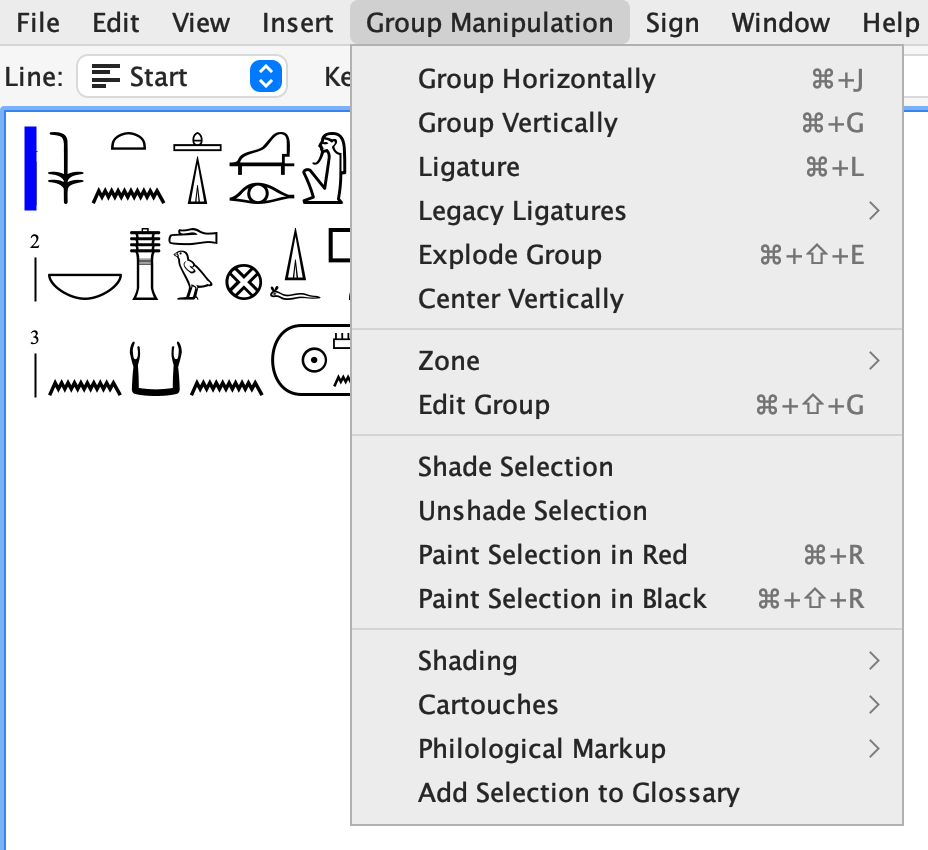
These commands apply to the selection, or, without selection, to the items before the cursor.
| Entry | Shortcut | What it does |
|---|---|---|
| Group Horizontally | Ctrl+H (Mac: ⌘J) | places the items side by side (Grouping signs) |
| Group Vertically | Ctrl+G (⌘G) | places the items one above the other |
| Ligature | Ctrl+L (⌘L) | makes an insertion; used again, chooses another one (Insertions) |
| Legacy Ligatures > Ligature Elements | Ctrl+Alt+L (⌘⌥L) | old-style ligature (Ligatures) |
| Legacy Ligatures > Ligature group with Hieroglyph | Ctrl+K | a group in the "before" area of a sign |
| Legacy Ligatures > Ligature hieroglyph with group | Ctrl+M | a group in the "after" area of a sign |
| Explode Group | Ctrl+Shift+E (⌘⇧E) | separates the signs of a group |
| Center Vertically | centres a sign vertically in its quadrat | |
| Zone > Insert Zone... | puts the selection in a new zone (Zones) | |
| Zone > Unwrap Zone | removes the zone around the cursor | |
| Zone > Edit Zone Settings... | settings of the zone around the cursor | |
| Edit Group | Ctrl+Shift+G (⌘⇧G) | opens the group editor |
| Shade Selection, Unshade Selection | shades whole quadrats (Shading and red ink) | |
| Paint Selection in Red | Ctrl+R (⌘R) | writes the selection in red |
| Paint Selection in Black | Ctrl+Shift+R (⌘⇧R) | back to black |
| Shading |
# key |
shades quarters of quadrats |
| Cartouches | cartouche, serekh, Hwt, enclosures, and their partial forms (Cartouches) | |
| Philological Markup | editorial brackets and arrows (Philological marks) | |
| Add Selection to Glossary | Your own shortcuts: the glossary |