JSesh 9 Documentation
Tabs and synoptic editions
In a synoptic edition, several versions of a text are written one above the other, so that corresponding words are aligned. JSesh does this with tabs, as in a word processor: a tab pushes what follows to the next tab stop, and the stops are shared by all the lines.
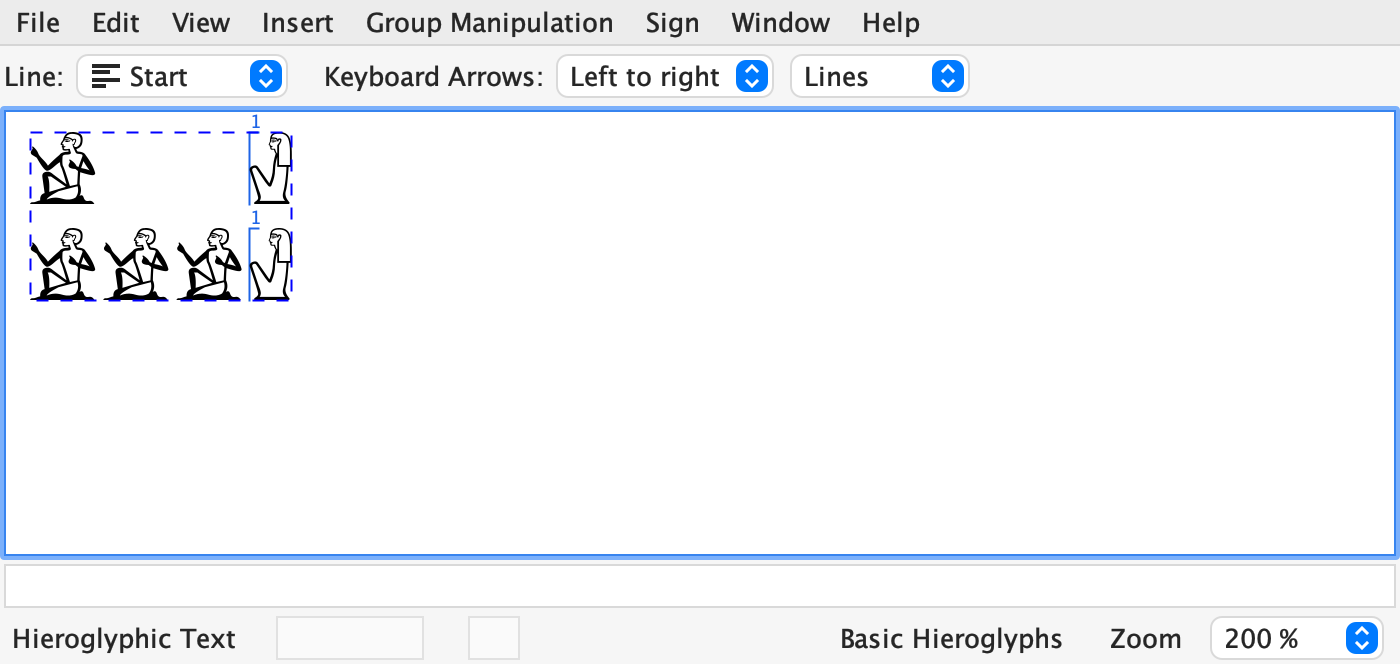
Tabs only work inside a zone. In the main text, they are kept but have no effect.
Building a Tabbing Environment
- Create a zone (Group Manipulation > Zone > Insert Zone...).
- In the zone, type the first version; at each place where the next "column" of the table starts, choose Insert > Tabs > Tab (Ctrl+Alt+T, Mac: ⌘⌥T).
- Press Enter, and type the next version, with tabs at the corresponding places.
The first tab of each line goes to the first stop, the second to the second, and so on. The stop is placed after the longest cell before it, plus a small gap (the Minimal space before a tab stop of the zone settings).
View > Show Tabs shows the tabs and the number of their stop.
Skipping a stop
When a version lacks a passage, its line must jump over a column. Put the cursor after the tab and choose Insert > Tabs > Move Tab to Next Stop (or Move Tab to Previous Stop).
Aligning a cell
The text before a tab is normally aligned at the start of its cell. Insert > Tabs also contains:
- Align Cell Before Tab at Start;
- Center Cell Before Tab;
- Align Cell Before Tab at End;
- Justify Cell Before Tab.
Lacunae in tables
An extended lacuna or haplography with Fill the line fills the rest of its cell, up to the next stop. This is a convenient way to show that a version lacks a passage.
In the code
%tab, with options: %tab[n=3] goes to stop 3, %tab[align=end] aligns the cell before the tab at its end.