JSesh 9 Documentation
Insertions: placing a sign inside another
Scribes often place a small sign in the empty space of a larger one: under the belly of a bird, between the legs of a man, in the angle of an arm. JSesh calls this an insertion:
| Without insertion | With insertion |
|---|---|
JSesh computes the free space from the actual drawing of the signs. Insertions therefore work with all signs, including your own.
The insertion mechanism is very much inspired by the insert operator imagined by Mark-Jan Nederhof in his Revised Encoding Scheme.
Making an insertion
- Type the two signs (or groups), for instance
G1andt, as two quadrats. - Choose Group Manipulation > Ligature (Ctrl+L, Mac: ⌘L).
JSesh tries all the possible places, and keeps the one where the inserted sign is the largest. It works on the two items before the cursor, or on the selection if it contains exactly two items.
Choosing another place
If the result is not the one you want, press Ctrl+L (Mac: ⌘L) again, just after the insertion. A window shows the possible insertions, with the percentage of the free space each one uses:
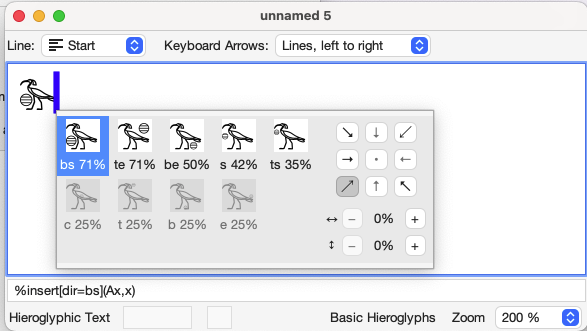
- Choose one of the proposals with the mouse or with the arrow keys and Enter. Greyed proposals are places where the sign does not fit well, but you can still choose them.
- The grid of arrows on the right chooses the place directly: top-start, top, top-end, start, centre, end, bottom-start, bottom, bottom-end.
- The ↔ and ↕ buttons enlarge the frame of the main sign, horizontally or vertically, when the inserted sign needs more room.
- Escape closes the window.
"Start" and "end" follow the direction of the text: in a text written from right to left, "start" is on the right.
I would suggest you experiment with insertion to get the gist of it. It is a very useful feature, and not very difficult to use once you get the hang of it.
It can produce groups such as
Insertions inside insertions
Both the main element and the inserted element can be groups (t:N17 above), and an insertion can be inserted in turn into another sign. Build them step by step, from the inside.
For instance, I get good results for
- first, typing
Dandmd, and insertingmdintoD. I choose the bottom-start position, which gives a good positioning ofmdunder the head ofD:%insert[dir=bs](I10,S43) ; - Then I insert
i:n in this group, choosing “bottom” as direction.
Such a complex group can possibly be saved in the glossary for later use.
Undoing an insertion
Group Manipulation > Explode Group (Ctrl+Shift+E, Mac: ⌘⇧E) separates the signs again.
In the code
An insertion is written %insert[dir=bs](G1,t): insert t at the bottom-start (bs) of G1. The reference gives all the options.
Insertions and ligatures
Older versions of JSesh used ligatures for the same purpose. They are still available, but they only work for signs which have been prepared for them. See Ligatures.