JSesh 9 Documentation
Preparing a sign for ligatures
Introduction
Insertions compute the free space of each sign from its drawing, and need no preparation. The older ligatures, however, use ligature zones: areas of the sign where another group can be placed. JSesh computes them automatically, but the person who draws a sign can define them in the SVG file, with Inkscape.
Ligature zones
For each sign, JSesh will try to compute two ligature zones, one for ligatures of groups before the sign, the other for ligatures of groups after the sign. Those zones can be computed automatically, but the sign author can also provide them.
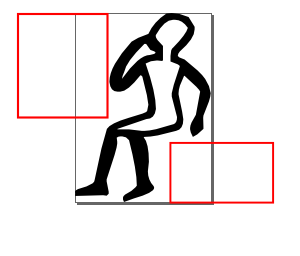
To create one of the two ligature zones in Inkscape, do the following:
- create a rectangle where the group should fit. Note that the whole group will be scaled to fit there, so draw it large enough. I usually draw these rectangles in red, but it's only a convention.
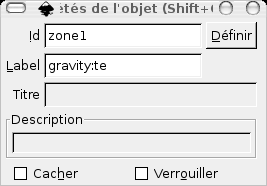
- open the contextual menu for the rectangle (right-click over it), and choose Object Properties. You get the window shown below. Set the Id to
zone1(the zone for groups placed before the sign) orzone2(the zone for groups placed after it). Click the button which validates the change (Set or Define, depending on the version of Inkscape). Clear the Label, or use it for the gravity (see below).
Admittedly, we are using the id and label information in a way they are not supposed to be used. The reason for this is purely pragmatic. It's far easier to do things that way, as the sign creator has no need to know about the inner organization of the XML format.
Ligature zones gravity
The ligatured group will go somewhere in the ligature zone. But where exactly ? It can stand in the middle of the area, or stick to one of its sides. In fact, the behaviour of the layout algorithm is not always the same. In  , the "t" tends to fit on the bottom left of the rectangular area. In
 , the sign U36 is more or less centered, both horizontally and vertically. JSesh allows signs authors to design the behaviour of "ligature zones", in the following way. To do so, set the Label of the rectangle to
gravity: followed by one or two letters, without spaces (for instance gravity:te):
-
soreto ask the group to stick to the start side or to the end side of the zone1. If neithersnoreis specified, the group will be horizontally centered. -
torbto ask the group to stick to the top or bottom of the zone. If neither "t" nor "b" is specified, the group will be vertically centered.
In the window shown above, gravity:te means that the group ligatured in zone1 (before the "child" sign) sticks to the top of the red rectangle, and to its end, that is, near the sign:  .
-
startandendare taken from M.-J. Nederhof's RES, and avoid the use of “left” and “right” , which are not really usable for hieroglyphs. ↩