JSesh 9 Documentation
The File menu
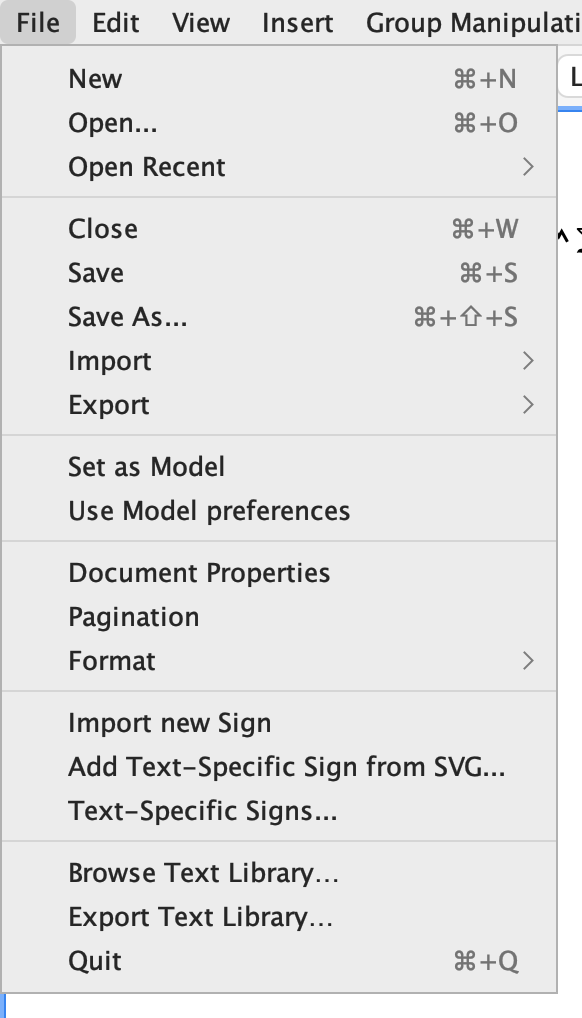
| Entry | Shortcut | What it does |
|---|---|---|
| New | Ctrl+N (⌘N) | opens a new, empty document |
| Open... | Ctrl+O (⌘O) | opens a document (Saving and opening) |
| Open Recent | the last documents opened | |
| Close | Ctrl+W (⌘W) | closes the window |
| Save | Ctrl+S (⌘S) | saves the document |
| Save As... | Ctrl+Shift+S (⌘⇧S) | saves under another name |
| Import > Import from pasted PDF, Import from pasted RTF | reads back hieroglyphs copied from a word processor (Getting hieroglyphs back) | |
| Export > Export as JPEG or PNG... | Ctrl+Shift+B (⌘⇧B) | bitmap picture (Exporting pictures) |
| Export > Export as WMF, Export as EMF, Export as MacPict, export as EPS, export as SVG | vector pictures (Exporting pictures) | |
| Export > Export as PDF | PDF file (Printing and PDF export) | |
| Export > Export as RTF | document for word processors (Exporting as RTF) | |
| Export > Export as HTML | web pages (Exporting pictures) | |
| Export > Export Text-Specific Signs as SVG... | saves the signs stored in the document (Adding a sign of your own) | |
| Export > Quick PDF Export | Ctrl+Shift+F1 (⌘⇧F1) | PDF in the quick export folder, without questions |
| Export > Select Quick PDF Export Folder | chooses this folder | |
| Set as Model | the settings of this document become the default for new documents (Document settings) | |
| Use Model preferences | applies the default settings to this document | |
| Document Properties | sizes, spacing and options of the document (Document settings) | |
| Pagination | page size, margins, title, page numbers (Pages) | |
| Format > Text in Lines, Text in Columns | orientation of the text (Lines, columns and direction) | |
| Format > Left-to-Right Text, Right-to-Left Text | direction of writing | |
| Format > Center small signs | centres small signs in their quadrat | |
| Import new Sign | adds signs to your sign folder (Installing new signs) | |
| Add Text-Specific Sign from SVG... | stores a sign in the document (Adding a sign of your own) | |
| Text-Specific Signs... | lists the signs stored in the document | |
| Browse Text Library… | opens a text of the library (The text library) | |
| Export Text Library… | copies the whole library to a folder | |
| Quit | Ctrl+Q (⌘Q) | quits JSesh (on a Mac: in the JSesh menu) |