Documentación de JSesh
Core concepts
Core concepts
Manuel de Codage (MdC) is the plain-text encoding for Egyptian hieroglyphs (for instance i-w-r:a-ra-m-p*t:pt). JSesh reads, edits, renders and writes MdC.
Representing a text
Three types represent hieroglyphic texts, with increasing richness:
| Type | What it is | Package |
|---|---|---|
HieroglyphicText (formerly TopItemList) |
The actual hieroglyphic text: a tree of hieroglyphs, cadrats, cartouches, line breaks... This is the in-memory representation of a text. | jsesh.model |
MDCDocument |
A HieroglyphicText plus file metadata (path, encoding, dialect, preferences). It's what you load from and save to disk. |
jsesh.document |
HieroglyphicTextModel |
A live, observable, undoable wrapper around a HieroglyphicText, used by the editor. |
jsesh.document |
Rule of thumb:
- batch or server code which only transforms text: use
HieroglyphicText; - loading and saving files: use
MDCDocument; - anything interactive (an editor, undo/redo, change notification): use
HieroglyphicTextModel.
Rendering
Rendering needs two contexts:
- a
JSeshRenderContext: what to draw with (a style and a font/shape repository); - a
JSeshTechRenderContext: where to draw (theGraphics2D, the device scale).
The MDCDrawingFacade class hides both in the usual cases. See Rendering.
Resources
Fonts, sign database and completion data are grouped in a HieroglyphResources object, which you build with HieroglyphResourcesBuilder. See Resources and fonts.
Immutable objects and construction builders
In previous versions, some objects (in particular DrawingSpecification) were mutable, which caused problems when they were shared between components (for instance between the editor and the group editor). It was difficult to know who had modified what.
JSesh 8 favours immutable objects, as is increasingly common in object-oriented programming. JSeshStyle, for instance, is an immutable record. When you need a modified version of an immutable object, you create a new one. That's what happens with Java strings:
String example = "Hello";
String upper = example.toUpperCase(); // creates a new string, example is unchanged
Of course, a variable can still be made to point to another object:
String example = "Hello";
example = example.toUpperCase();
Here, example, which formerly pointed to the string "Hello", now points to "HELLO"; the old string is unchanged.
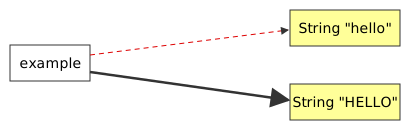
For composite objects such as JSeshStyle, the basic way to get a modified version is to create a new instance:
JSeshStyle style = JSeshStyle.DEFAULT;
// New painting specifications
PaintingSpecifications newPainting = ...;
// create a new style with a modified value
JSeshStyle newStyle = new JSeshStyle(
    style.geometry(),
    newPainting,
    style.fonts(),
    style.options());
This is not very convenient, hence the use of what Martin Fowler calls a construction builder. copy() gives you a builder initialised with the current values; you change what you need, then call build():
JSeshStyle style = JSeshStyle.DEFAULT.copy()
    .options(o -> o.textDirection(TextDirection.RIGHT_TO_LEFT)
                   .smallSignCentered(true))
    .geometry(g -> g.leftMargin(10)
                    .topMargin(10))
    .build();
Sharing is now explicit rather than implicit. A JSeshStyle can safely be used in several places: replacing a value in one of them leaves the others unchanged.
If you want several components to share the same style, and follow its changes (for instance to use the same style in all of your editors), use a JSeshStyleReference.